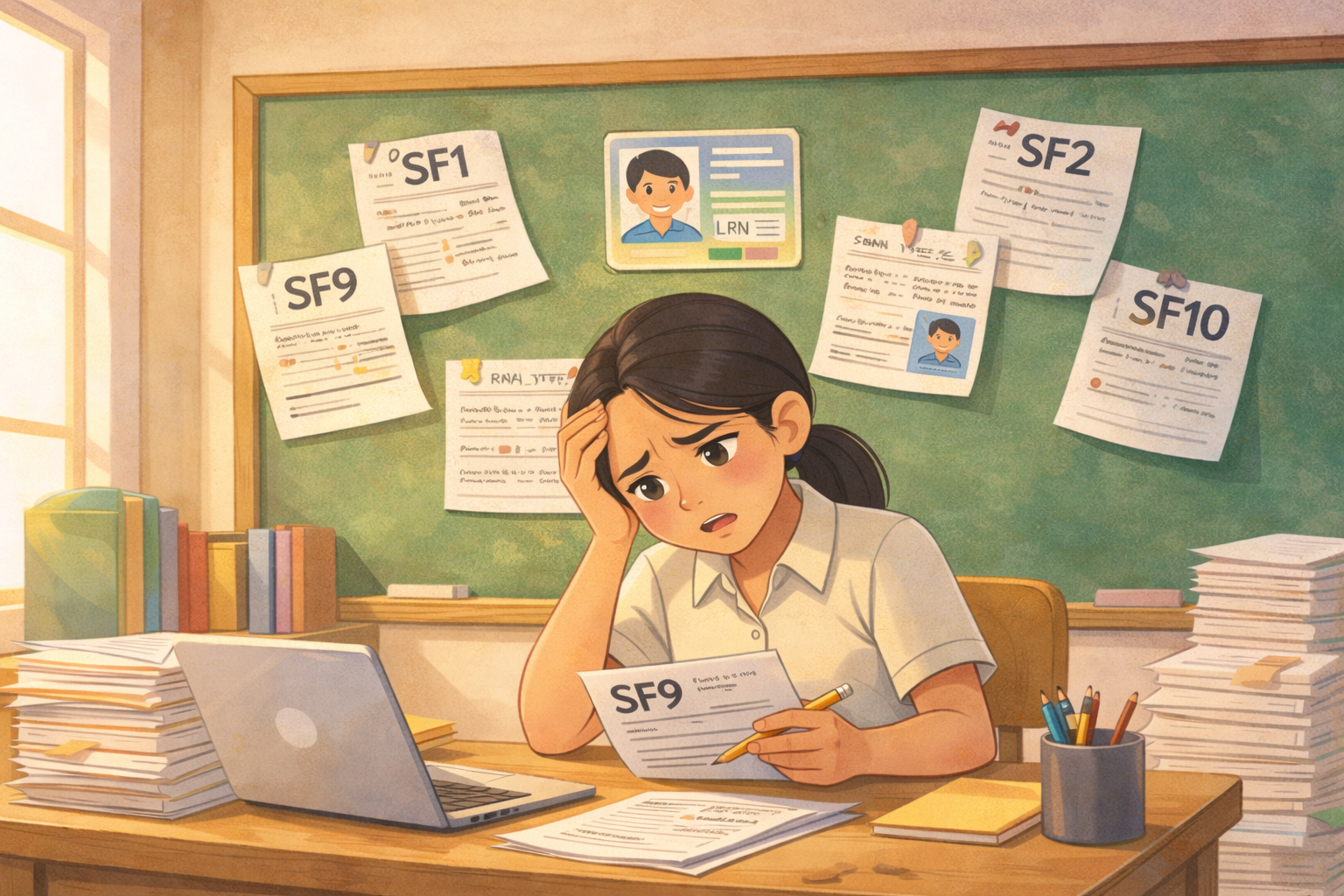
The easiest way to make sure your SF5 is accurate without all the manual work is to use a grading system where SF5 is created from the same records as SF9. By using one set of grades, you avoid mistakes that happen when copying grades from one form to another.
Why SF5 is a Teacher’s Greatest Stressor

For most, March signals the start of summer vacation. For teachers, it signals the arrival of the School Form 5 (SF5), officially known as the Report on Promotion and Level of Proficiency. This critical document is the official summary of a student's entire academic year, capturing:
- Final Grades: The culmination of four quarters of work.
- Promotion Status: Determining if a student is Promoted, Retained, or requires Remediation.
- Proficiency Level: Classifying performance from "Did Not Meet Expectations" to "Outstanding".
The problem isn't the form itself; it’s the manual transcription process. Teachers spend hours copying grades from class records to SF9 report cards, and then again to the SF5. This "triple-entry" system is where errors thrive. A single mismatched grade between an SF5 and an SF9 can lead to hours of re-calculation or a permanent error on a student’s official record (SF10)
10 DIY Solutions and Routines You Can Try
Before fully automated systems existed, resourceful educators developed their own "survival strategies." Here are the most common tips and routines found in teacher forums and social media groups to manage the SF5 workload:
- Spreadsheet Automation (e.g., VLOOKUP): Teachers set up electronic gradebooks and use Excel formulas like VLOOKUP to pull grades from a primary class record into a working SF5 sheet. This cuts down on repetitive typing and reduces errors.
- Four‑Eyes Review: To catch mistakes before submission, teachers often team up — one reads the SF9 grades aloud while the other compares them to the SF5 entries. This double‑checking helps spot transcription errors early.
- Color Coding: Many highlight failing or “at‑risk” grades in red as soon as they appear. This makes it easier to spot students who may be marked “Conditional” or “Retained” on the SF5 without having to scan every row.
- Batch Processing: Instead of doing everything at once, teachers break the work into chunks — for example, entering all names one day, all grades the next, and status changes another day — which helps maintain focus and reduce mistakes from task switching.
- Master Summary List: A single “Master List” spreadsheet is often maintained as the authoritative reference. Keeping all key data in one place helps ensure consistency between the SF9, SF5, and other records.
- Incremental Updating: Rather than waiting until the final week of the year, grades are added to a draft SF5 as each quarter ends. Updating incrementally prevents rushed work and missing entries later.
- Auto‑Fill Macros: Some teachers use simple Excel macros to automate repetitive tasks — like counting male vs. female students in summary tables — saving time and reducing manual counting errors.
- Early LIS Check (“Prep‑Run”): Teachers sometimes download the LIS‑generated SF5 early to confirm that enrollment lists match their class records before doing any grade entry.
- Proofreading on Paper: A printed draft SF5 can be placed beside the SF9s, and using a ruler or guide, teachers verify entries line by line to ensure nothing was skipped during typing.
- Standardized Templates: Districts or teacher groups often share automated Excel templates to help with grading tasks. These templates help speed up work, but they still require manual entry and may not integrate with all forms like the SF10.
How a Single Platform Fixes DepEd Form Data Inconsistency for Teachers?
Preparing the SF5 has always been time-consuming and prone to errors, with teachers manually transferring grades from class records and SF9s. BetterTeachingSolutions (BTS) automates this process by directly pulling data from SF9 into the SF5, ensuring every entry is accurate and consistent. This eliminates repetitive manual work, saves teachers hours, and allows them to focus on teaching instead of double-checking forms.
BTS Solution: Accurate SF5 Without Manual Work
BetterTeachingSolutions (BTS) eliminates the manual work of preparing the SF5 by leveraging the data already entered throughout the year. Since quarterly grades are recorded in the system, teachers aren’t typing the SF5, they’re generating it instantly.
The platform also applies DepEd’s promotion criteria automatically, identifying which students meet the requirements for promotion and flagging those who need remediation. Because both the SF9 (Report Card) and SF5 draw from the exact same dataset, mismatches are impossible. On top of that, summary tables, such as counts of “Promoted” versus “Retained” by gender, are automatically generated, removing the need for time-consuming manual calculations.
Better Teaching Solutions: SF5 Accuracy Made Easy – No Manual Re-Entry Needed
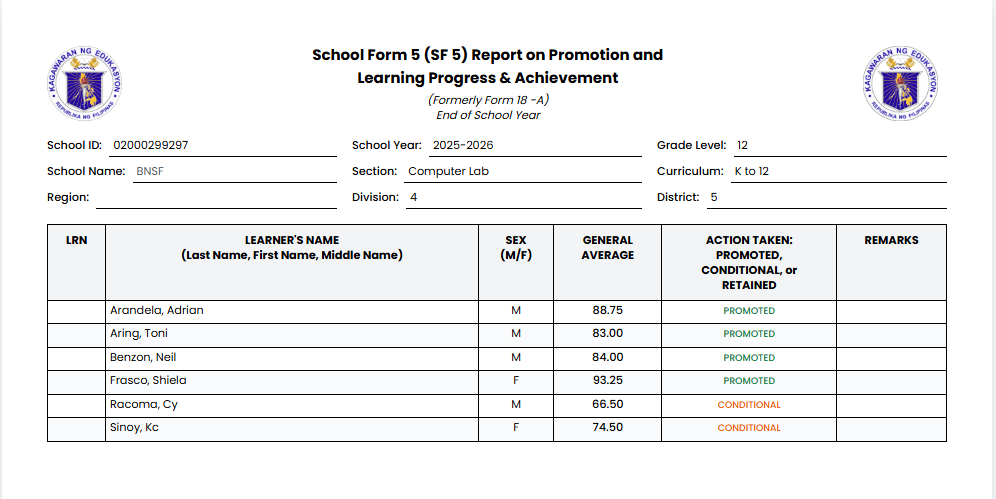
With Better Teaching Solutions, preparing your SF5 doesn’t have to be stressful or time-consuming. Instead of spending hours manually entering grades, the system pulls all your learners’ records and generates the SF5 for you automatically.
It even checks final grades against DepEd promotion rules, so you can be confident that each student’s promotion status is correct. The report is also cross-checked with SF9 grades, helping avoid any mismatches or errors that often cause headaches during submission.
Students who need remediation or are at risk of retention are flagged right away, making it easier to plan support and interventions. And when it’s done, the SF5 comes out in a clean, print-ready format, no extra formatting or adjustments needed.
- Final Grade Compilation – Automatic calculation of general averages from all subjects.
- Promotion Status Determination – Promoted, Conditional, or Retained are assigned according to official criteria.
- Proficiency Level Classification – Learners are categorized from Did Not Meet Expectations to Outstanding.
- SF9 Cross-Validation – Ensures perfect alignment between report cards and SF5.
- Print-Ready Submission – Export DepEd-compliant SF5 documents ready for printing in one click.
- Data Consistency & Accuracy Checks – Highlights incomplete grades or anomalies before export.
Real-Life Impact
- Manual Setting: Verifying grades and cross-checking SF9 averages 3–4.5 hours per class.
- With BTS: SF5 generation and validation take 15–20 minutes per class.
- Teachers close the year faster, stress-free, and confident in the accuracy of official records.
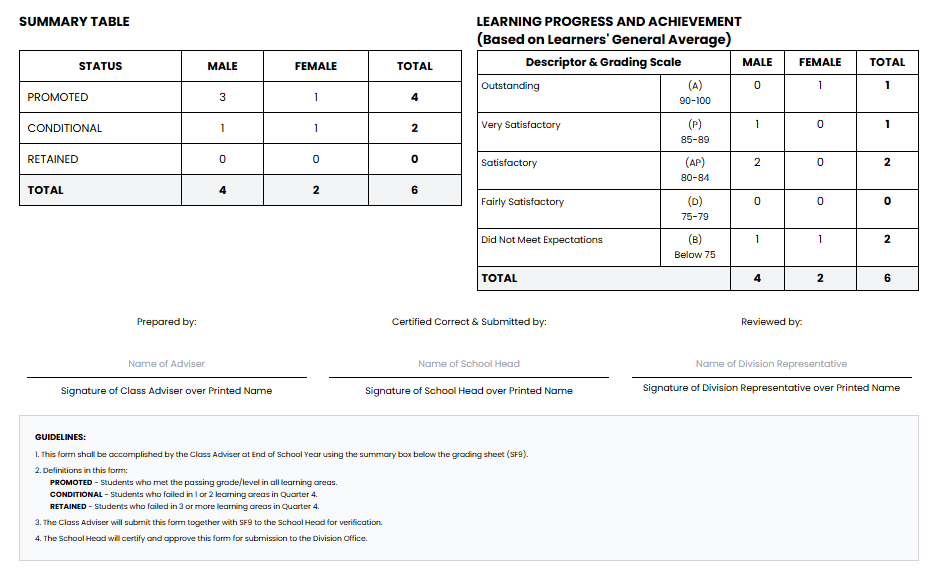
BetterTeachingSolutions (BTS) automates SF5 preparation, turning hours of manual work into minutes. It calculates final grades, determines promotion status, classifies proficiency levels, and ensures perfect alignment with SF9. Built-in accuracy checks flag incomplete or inconsistent data, and print-ready, DepEd-compliant SF5 documents are generated with one click.
What once took 3 to 4.5 hours per class can now be done in 15–20 minutes, letting teachers submit accurate reports quickly, reduce stress, and focus on what matters most supporting their students.
The Time Reality: A Comparison

In a traditional manual setting (even with spreadsheet "hacks"), verifying grades and cross-checking against SF9 takes an average of 3 to 4.5 hours per class. With BTS automated generation, that time is slashed to 15–20 minutes.
Final Takeaway
Accuracy in SF5 is non-negotiable because it affects a student's permanent future. Technology should handle the data management so you can focus on the judgment calls—knowing your students and ensuring fair outcomes.
Frequently Asked Questions
Author
Better Teaching Solutions